customElements
& beyond

Emiliano Pisu
Father of 2 lovely "monsters"D&D master, player ... whatever Head of DevX & AI Engineer
@ Webidoo Engineering Sensei & Co-Host
@ Dev Dojo IT
 linkedin.com/in/pixu1980
 github.com/pixu1980
 codepen.io/pixu1980
linkedin.com/company/dev-dojo-it/
 youtube.com/@devdojo_it
 twitch.tv/devdojo_it
 @devdojo_it
How I hope you feel after this talk?

🚨 Bold Opinion Alert 🚨
After years of "experimentation" in UI Libraries and Frameworks, their APIs are becoming canonical

The web standards are
coming back into the field
(honestly... they've always been here)

customElements === Web Components?
!true
Web Components is a common term used to describe a set of 3 web platform APIs
In this talk we will focus only
on customElements API
In particular the customElements v1 API, also known as "customized build-in elements"
but a blazing fast Polyfill is available
Defining a customElement
-
Autonomous: a brand new tag
e.g. <pix-button> -
Customized built-in: an existing tag
e.g. <button is="pix-button">
Autonomous vs customized built-in
// autonomous custom element
class PixButton extends HTMLButtonElement {
  constructor() {
    super();
    this.setAttribute('type', 'button');
  }
}

customElements.define('pix-button', PixButton);

// usage
<pix-button>Click me!</pix-button>
// customized built-in element
class PixButton extends HTMLButtonElement {
  constructor() {
    super();
    this.setAttribute('type', 'button');
  }
}

customElements.define('pix-button', PixButton, { extends: 'button' });

// usage
<button is="pix-button">Click me!</button>
Choosing the right base
| Element | Use when you need |
|---|---|
| <button> | Clickable actions, form submission |
| <input> | User input, form data, validation |
| <div> | Generic container, layout |
| <a> | Navigation, links |
| <img> | Image display with enhancements |
Choosing the right base
💡 Just an advice: always extend the most semantic element, the closest one to your use caseFirst Touch: a Click Counter
// 1. define the class
class CounterButton extends HTMLButtonElement {
  constructor() {
    super();
    this.count = 0;
  }

  connectedCallback() {
    this.addEventListener('click', this.handleClick);
  }

  handleClick = () => {
    this.count++;
    this.updateText();
  };

  updateText() {
    this.textContent = `Clicked ${this.count} times`;
  }
}

// 2. register the element
customElements.define('counter-button', CounterButton, {
  extends: 'button'
});

// 3. use it in the DOM
<button is="counter-button">Click me</button>
Live Demo:
Lifecycle Callbacks
- constructor(): element created, state only, prefer no DOM or attributes
- connectedCallback(): inserted into the DOM, render and attach listeners here
- attributeChangedCallback(): an observed attribute changes, update the element accordingly
- disconnectedCallback(): removed from the DOM, clean up listeners, timers, observers
All four lifecycle callbacks in a class
class PixButton extends HTMLButtonElement {
  constructor() {
    super();
    // initialize state only, no DOM here
    this.count = 0;
  }

  connectedCallback() {
    // DOM and attributes are ready: render + attach listeners
    this.render();
    this.addEventListener('click', this.handleClick);
  }

  disconnectedCallback() {
    // remove listeners and clear timers/observers
    this.removeEventListener('click', this.handleClick);
    this.interval && clearInterval(this.interval);
  }

  static get observedAttributes() {
    return ['value', 'disabled'];
  }

  attributeChangedCallback(name, oldValue, newValue) {
    name === 'value' && this.updateValue(newValue);
  }
}
Attributes vs Properties
| Aspect | Attributes (HTML) | Properties (JS) |
|---|---|---|
| Type | strings (or null) | any JavaScript value |
| Defined in | HTML markup | JavaScript |
| Access | getAttribute() / setAttribute() | element.prop |
| Reactivity | triggers attributeChangedCallback() | does not trigger callbacks |
Reflection & observed attributes
class MyButton extends HTMLButtonElement {
  // reflection: keep property and attribute in sync
  get value() {
    return this.getAttribute('value');
  }

  set value(val) {
    this.setAttribute('value', val);
  }

  // reactivity: observe only the attributes you need
  static get observedAttributes() {
    return ['value', 'disabled'];
  }

  attributeChangedCallback(name, oldValue, newValue) {
    name === 'value' && this.updateValue(newValue);
  }
}
Reflection & observed attributes
- Use attributes for simple, serializable values
- Use properties for complex objects or functions
- Reflect simple properties to attributes when possible
Some questions
I expect from you...
Expected Question #1:
"Nice, so do I have to write
all this `boilerplate` code? every time??"
Of course not!
Expected Question #2:
"So it's possible to replicate or mimic the most common features of Lit, Angular, React, Vue??"
Well, yes!
Expected Question #3:
"Do you mean we can implement metaprogramming, static initialization blocks, mixins, decorator pattern, lifecycle hooks,
two way data binding, reactivity??
in vanillaJS 😱?"
Hell, yeah 🔥!

First of all, extend native HTML elements
export class PixButton extends HTMLButtonElement {}

export class PixInput extends HTMLInputElement {}

export class PixDialog extends HTMLDialogElement {}

export class PixDetails extends HTMLDetailsElement {}
Yes, no base classes === no centralization
So how can we centralize common features like registration, attributes handling, events handling, lifecycle methods... without base classes?
Static Initialization Blocks (MDN)
export class Button extends HTMLButtonElement {
  static name = "pix-button";

  ...

  /**
  * static initialization
  *
  * @static
  * @memberof Button
  */
  static {
    componentDecorator("Button", Button);
  }

 ...
}

// import '@pix-ui/button';

// Yippie Kai Yay, motherf...
// ehm... static initialization blocks!

Decorators? Mixins?
export function componentDecorator(componentName, component) {
assertMetaKey(component, "name");
defineCustomElement(component);
applyMixinsToComponent(component);
exposeComponent(componentName, component);
}
export function defineCustomElement(component) {
!customElements?.get(component.name) &&
customElements.define(
component.name,
component,
buildExtendOptions(component)
);
}
export function buildExtendOptions(mixins) {
return mixins.extends ? { extends: mixins.extends } : undefined;
// this allows to
// instead of
Metaprogramming!
/**
* PixUI Button class
*
* @export
* @class PixButton
* @extends {HTMLButtonElement}
*/
export class PixButton extends HTMLButtonElement {
  static name = "pix-button";
  static extends = "button";

  static attributes = {
    disabled: (oldValue, newValue) => {
      console.log("disabled changed", oldValue, newValue, this.textContent);
    }
  }

  static events = {
    click: function (e) {
      console.log("button clicked", this.textContent);
    },
  }

 ...
}

// The instance will have
class Button extends HTMLButtonElement {
  ...

  handleDisabledAttributeChanged(oldValue, newValue) => {
    console.log("disabled changed", oldValue, newValue, this.textContent);
  }

  handleClickEvent(e) {
    console.log("button clicked", this.textContent);
  }

  ...
}

// Yippie Kai Yay... motherf...
// ehm... vanilla metaprogramming!
Lifecycle methods
element.addEventListener('eventname', eventHandler);
The handleEvent pattern
From MDN: The object that receives a notification (an object that implements the Event interface) when an event of the specified type occurs. This must be null, an object with a handleEvent() method, or a JavaScript function. See The event listener callback for details on the callback itself.Lifecycle methods?
export function buildLifecycleMethods(component) {
  return {
    handleEvent(e) {
      this[`handle${pascalize(e.type)}Event`]?.(e);
    },
    attributeChangedCallback(name, oldValue, newValue) {
      this[`handle${pascalize(name)}AttributeChanged`]?.(oldValue, newValue);
    },
    connectedCallback() {
      for (const event of Object.keys(component.events)) {
        this.addEventListener(event, this);
      }
    },
    disconnectedCallback() {
      for (const event of Object.keys(component.events)) {
        this.removeEventListener(event, this);
      }
    },
  };
}

// Yippie Kai Yay... motherf...
// ehm... vanilla lifecycle methods!
Reactivity & two-way data binding
// Two way binding with customized built-ins and a tiny store
function createStore(initial) {
  const listeners = new Map(); // key => Set(callback)

  const notify = (k, v) => {
    const set = listeners.get(k);
    if (!set) return;
    for (const fn of set) fn(v);
  };

  const state = new Proxy({ ...initial }, {
    set(target, key, value) {
      if (target[key] === value) return true;
      target[key] = value;
      notify(key, value);
      return true;
    }
  });

  return {
    state,
    subscribe(key, fn) {
      const set = listeners.get(key) || new Set();
      set.add(fn);
      listeners.set(key, set);
      fn(state[key]); // initial push
      return () => set.delete(fn);
    }
  };
}
Reactivity & two-way data binding
// Customized built-in input that binds to a store key
class BoundInput extends HTMLInputElement {
  connectedCallback() {
    this._key = this.getAttribute('data-bind') || '';
    if (!this._key) return;

    this._unsub = store.subscribe(this._key, (v) => {
      if (this.value !== String(v ?? '')) {
        this.value = String(v ?? '');
      }
    });

    this.addEventListener('input', this);
  }

  handleEvent(e) {
    if (e.type === 'input' && this._key) {
      store.state[this._key] = this.value;
    }
  }

  disconnectedCallback() {
    this.removeEventListener('input', this);
    this._unsub?.();
  }
}
Reactivity & two-way data binding
// Customized built-in span that reflects a store key
class BoundText extends HTMLSpanElement {
  connectedCallback() {
    this._key = this.getAttribute('data-bind') || '';
    if (!this._key) return;

    this._unsub = store.subscribe(this._key, (v) => {
      this.textContent = String(v ?? '');
    });
  }

  disconnectedCallback() { this._unsub?.(); }
}
Reactivity & two-way data binding
        <label>
          Name:
          <input is="bound-input" type="text" data-bind="name" placeholder="Type your name" />
        </label>
        <label>
          Nick:
          <input is="bound-input" type="text" data-bind="nick" placeholder="Type your nick" />
        </label>
        <p>
          Hello,
          <span is="bound-text" data-bind="name"></span>
          aka <span is="bound-text" data-bind="nick"></span>!
        </p>
Reactivity & two-way data binding
// Store singleton for the page
const store = createStore({ name: '', nick: '' });

customElements.define('bound-input', BoundInput, {
  extends: 'input'
});
customElements.define('bound-text', BoundText, {
  extends: 'span'
});

// Yippie Kai Yay... motherf...
// vanilla reactivity & two-way data binding!
Hello, aka !
Can we go further?
The Store
What a Store actually is?
A store is a shared state tree plus a notification contract: one source of truth for the data, and a predictable way to tell the rest of the app when that data changes.Proxy watches, Reflect does the work
class Store {
  constructor(initialState) {
    this.target = deepClone(initialState);
    this.state = this.#createProxy(this.target, []);
  }

  #createProxy(target, path) {
    if (!isObject(target)) return target;
    if (this.proxyCache.has(target)) return this.proxyCache.get(target);

    const proxy = new Proxy(target, {
      get: (raw, key) => {
        const value = Reflect.get(raw, key);
        return isObject(value) ? this.#createProxy(value, [...path, key]) : value;
      },
      set: (raw, key, value) => {
        const old = raw[key];
        const result = Reflect.set(raw, key, value);
        if (old !== prepared) this.#emitChange([...path, key], old, value);
        return result;
      },
    });

    return proxy;
  }
}
emitChange(): the store speaks with CustomEvent
#emitChange(path, oldValue, newValue) {
  // A single, explicit event for every successful write.
  const detail = {
    path: pathToString(path),
    oldValue: deepClone(oldValue),
    newValue: deepClone(newValue),
  };

  // EventTarget keeps persistence, logging and the
  // custom elements decoupled from the store itself.
  this.events.dispatchEvent(
    new CustomEvent("store:change", { detail }),
  );
}
The DOM Parts
What a DOM Part actually is?
A DOM Part is not a component and not even a DOM node: it's a key-valued update slot inside a rendered template, keeps a reference to the related DOM node.The DOM parts used by the engine
- ChildNodePart: DOM nodes (text, elements, nested templates)
- AttributePart: HTML attributes and the model binding
- PropertyPart: JavaScript properties (eg. .value, .checked)
- EventPart: Event listeners (eg. @click)
- RangePart: The start/end markers around a dynamic region for text interpolation
The Template Engine
html tagged templates + render
A template is just a tagged template literal. render mounts it into a container and, on the next call, updates only the parts that changed.
const view = html`
  ${ title }
  <button @click=${() => store.state.count += 1}>
    +1
  </button>
`;
A template inside a custom element
A component declares metadata, a static {} registration and a render(state). The decorator wires live rendering on store:change: no manual listeners, noinnerHTML.
import { html } from "@/core/index.js";
import { componentDecorator } from "@/lib/component-decorator.js";

/** Summary stat cards. */
export class CebStatsRow extends HTMLElement {
  static name = "ceb-stats-row";

  static {
    componentDecorator("StatsRow", CebStatsRow);
  }

  render(state) {
    return html`<p>Total: ${state.todos.length}</p>`;
  }
}
The engine diffs by part: only the changed nodes are committed, and inputs keep focus and caret.
<for> and <if> blocks
Each block keeps its own DOM part, so the engine updates the existing nodes in place: focus, caret and form state survive the re-render. Inner markup uses{{ }}, and
there is no second syntax.
<!-- one block per item, keyed by id -->
<for each="todo in todos">
  <li><ceb-todo-item data-id="{{ todo.id }}"></ceb-todo-item></li>
</for>

<!-- conditional block -->
<if condition="isEmpty">
  <p>Nothing matches the current filters yet.</p>
</if>
Declarative form bindings
The store is the single source of truth: value / checked read it, @input / @change write it. No model directive, no hidden two-way magic.
      <!-- input: value reads, @input writes -->
      <input value="${todo.title}"
        @input=${(e) => updateTodo(id, {
          title: e.currentTarget.value
        })} />

      <!-- checkbox: checked + @change -->
      <input type="checkbox" checked=${todo.completed}
        @change=${(e) => updateTodo(id, {
          completed: e.currentTarget.checked
        })} />

      <!-- select: data-value applied after the options render -->
      <select data-value="${todo.priority}"
      @change=${(e) => updateTodo(id, {
          priority: e.currentTarget.value
        })}>

      </select>
Demo Time
Open the here.
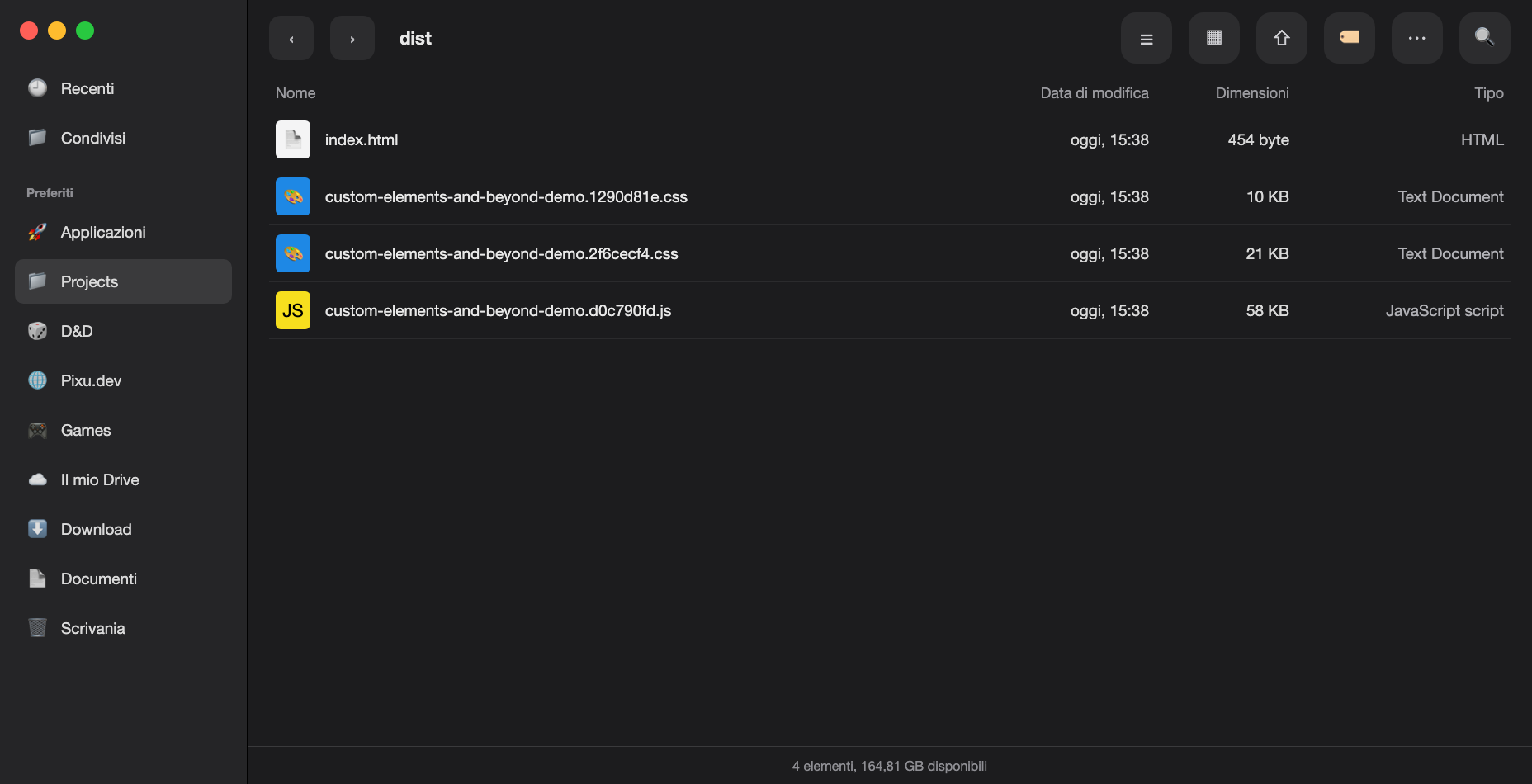
All this takes just...
Applause!
What the demo really proves?
- The store is the truth box, and every component keeps reading from the same Proxy tree
- store:change is the bell that wakes each custom element's render(state) after every mutation
- <for> and <if> are not cute helpers; they are the practical fingers that touch lists and conditionals all day long
- A tiny runtime can power a surprisingly rich interface, but the real product question is still how much of that runtime you want to own yourself
Resources and Links
Call to action
Build on the platform.
Extend, don't replace.
- Extend native elements with the {extends} pattern
- Design clear contracts: attributes, properties, events
- Prefer progressive enhancement and accessibility
- Ship ESM + optional adapters for frameworks
Slides Links


Demo Links


© 1987-2025 - Warner Bros. Entertainment Inc.
Grazie ❤️!